Designing the Inside-Out: UX Intelligence for the Agentic Web
The dawn of AI is here. To build quality UX today, we must understand the black box and design from the inside out.
TL;DR
The robots are here, and they don't care about your perfect shade of teal. I'm talking about Designing for Agents—AI entities that will navigate your product so users don't have to. Less visual fluff, more information architecture. HAL isn't impressed by your hero image.


The scene opens on a beautiful sunrise. In a rugged desert landscape where wild animals roam, ape-like creatures grunt in harmony while a leopard pounces—the brutal, beautiful circle of life. A tribe sits in a huddle around a watering hole when another tribe approaches; a fight over survival ensues.
The next day, one of the apes sees it: a black monolith standing tall, shiny and square, contrasting the jagged curves of the rocky landscape. A single brave ape reaches out tentatively and touches it. Then another, and another. The ominous music heightens. Their world has changed. They have become infinitely more intelligent.
With this literal “black box,” they evolve. They pick up the first tool—a bone—and use that knowledge to change their fate. The dawn of man has arrived.
This is the dawn of AI—the new “monolith” of our era. To be successful in building quality UX today, we can’t just stand back and stare. We have to reach out and touch the black box. We have to understand it and know how to use it effectively (and ideally, avoid beating each other with the bones).
For decades, UX teams have been the architects of the GUI (Graphical User Interface). We’ve obsessed over content strategy, user research, visual hierarchy, and the “F-pattern” of human eye movement. But the landscape has shifted. The AI black box has entered our world, and we can now pick up the tools and run.
To thrive in this brave new world, we must pivot. We are moving from a GUI-only mindset to an LLM-first world—where the primary “user” of your interface might not always be a human with a mouse, but an AI agent using a Terminal MCP, a ChatGPT plugin, or a local Gemini instance.
UX-as-Code & The Inside-Out Mandate
Content, design, and research aren’t enough if we don’t consider the architecture of the code itself. In my own portfolio, I’ve moved toward a UX-as-Code model—using centralized TypeScript data structures to manage content, logic, and metadata in one place. This isn’t just a developer convenience; it’s a UX imperative.
A core principle for this era: “If the backend is a mess, the AI experience will be a mess.” To build trustworthy AI, we have to start designing from the inside out.
At Cloudflare, I’m lucky to work alongside content engineers, data scientists, and product managers with what we call “Twitter brains”—people living on the bleeding edge of development. Learning from them has led me to a new realm of design thinking I call UX Intelligence.
Here are my takeaways and the principles I believe the UX community must start to adopt:
1. Building Information Architecture for Machines (IAM)
The role of the UX designer is expanding into Information Architecture for Machines. UX Intelligence isn’t just about how a human sees data on a dashboard; it’s about how that data is structured so an AI agent can interpret it with high confidence.
When an AI “hallucinates,” it’s often because the underlying data structure was ambiguous. This fails our users on the frontend and erodes the trust we’ve spent decades building. By designing the “inside” of our products to be machine-readable, we ensure the “outside”—the chatbot, the in-dash guidance, the automated insight—is accurate and actionable.
The Dual-Facing Interface: Engineering the Semantic Layer
Most legacy sites are optimized for visual crawlers or human eyes. They rely on “div soup” that looks great to a person but is a labyrinth for an LLM trying to parse a complex dashboard. To fix this, we need a “UI for LLMs.”
This is where UX Intelligence teams become essential advocates. While engineers build the experiences, we provide the connective tissue between design intent and technical implementation—translating a Figma file into semantic architecture that serves both humans and machines.
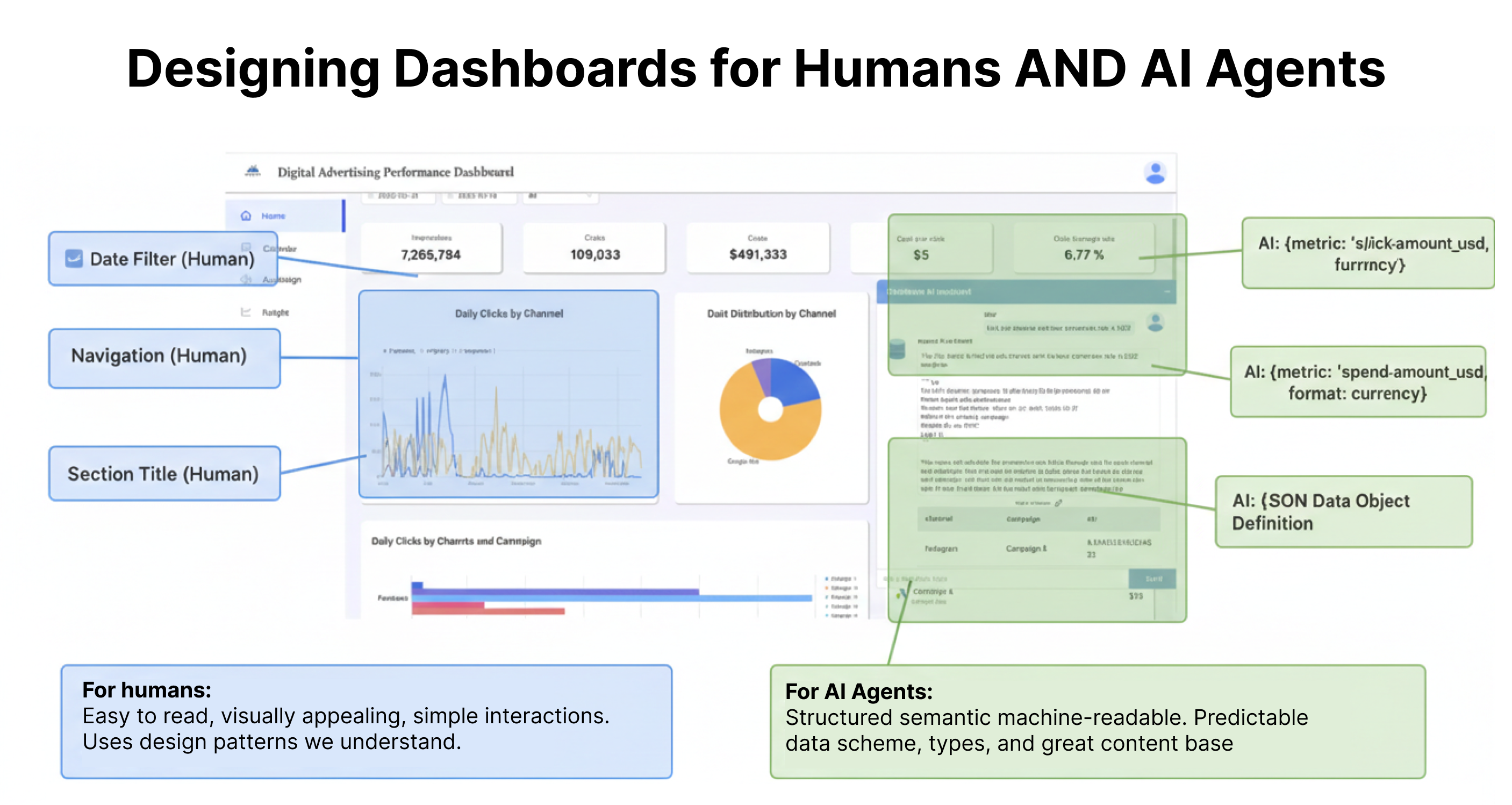
Things to consider:
The Semantic Skeleton
My specific tactic involves using a Component-First Architecture (leveraging frameworks like Astro) to deliver content within a strict semantic skeleton.
Deterministic Hooks: Using <article>, <nav>, and <section> tags correctly isn’t just for accessibility—it’s the architectural foundation for machine navigation.
Dashboard vs. Web: For dashboards, these tags provide the “hooks” internal agents use to navigate autonomously. For externally-oriented sites, we can optimize for crawlers that read standard HTML and agents that prefer token-light Markdown. These markers act as signs on a highway, telling the agent where the “Main Content” ends and “Navigation” begins.
Schema as UX: The Architecture of Partnership
By tagging data with specific schemas directly in the code, we provide a map for the AI. This is where UX defines the strategy and Engineering defines the implementation.
Standardizing Entities (UX Definition): Using SoftwareApplication for product features ensures the AI doesn’t mistake a specific product name for a generic noun.
Defining Relationships (UX Strategy): Using mainEntity or about tags helps the agent understand that this specific chart is a child of that server instance.
Exposing Intent (Engineering Handshake): Marking up interactive elements with PotentialAction schemas tells the agent exactly which API call to trigger when a user asks to “apply these changes.”
2. Satisfying the Power Users with Terminal MCPs & API UX
The rise of the Model Context Protocol (MCP) has created a new class of user: the developer who interacts with your product entirely through a terminal or an AI-orchestrated environment. But it isn’t just for power users. We are serving AI experiences to “classic” users within the dashboard—people who don’t want to think about how to use a product, they just want to complete a task.
For these AI-engaged users and agents, the “UI” is a JSON endpoint or a well-documented API schema.
Things to consider:
The Single Source of Truth: A UX Intelligence leader ensures that the backend “source of truth”—like a centralized portfolio.ts file or a content API—is identical for the terminal user and the web dashboard. Consistency across these layers is what defines a professional AI product.
Predictable Structures: Great API design is UX design. If your API returns inconsistent naming conventions, the AI agent will struggle to help the user. Clean, structured data is the ultimate affordance.
3. The Trust Layer: User Intent & RAG
Trust is the currency of AI. To provide “in-dash guidance” that users actually rely on, we must move beyond generic chatbots and into Retrieval-Augmented Generation (RAG). The Conversation Architecture is our tactic for listening to users and building experiences that meet them where they are. RAG is how we implement that feedback directly—ensuring AI doesn’t just guess, but retrieves.
Things to consider:
The UX of AI is a content-first approach: The expression “UX without content is just decoration” is even more vital in this new world order. Documentation, prompts, and natural language inputs are the golden center of the experience. If this isn’t crisp, we Blame Santor*.
Designing the Metadata
To solve for accuracy, we must design Metadata Wrappers. Every piece of data served to the AI should be tagged with:
Certainty Scores: In the backend, this means tagging responses with confidence levels. In the dashboard, it means surfacing that confidence to users—whether through visual indicators, explanatory text, or tiered recommendations. When the system is uncertain, the experience should reflect that honestly. (Check out my Don’t Yoko Your UX blog for more on managing AI confidence.)
Source Citations: Building a direct path from the AI’s summary back to the raw log or documentation page.
Recency Stamps: Ensuring the AI doesn’t hallucinate based on stale data. Writers strategically reviewing and updating AI output isn’t a luxury—it’s essential.
4. Designing for “Graceful Failure”
In building my UX Intelligence team, I’ve found that the biggest friction point isn’t when the AI succeeds—it’s when it fails. AI hype often ignores the “I don’t know” scenario.
The Logic of the “Inside-Out” Exit
We must optimize the backend so that when an AI reaches a confidence threshold below a certain percentage, it doesn’t guess. Instead, it triggers a Graceful Failure UI.
Things to consider:
The Pivot to Human: Automatically surfacing the “Contact Support” button or a specific help article based on the failed query.
The Debug View: Providing the user with a clear explanation of why the data couldn’t be retrieved.
Listen, Respond, Measure: We recently saw feedback that simply said, “I hate AI. I hate AI. I hate AI.” We have to lean into that. We must understand what users expect and where we are missing the mark.
This systematic approach is how we’ve reduced support tickets and increased engagement. We shouldn’t just add a chatbot; we must build systems that know their own limits.
5. You’re Rarely Alone: Your Engineers are Your Best Friends
Here’s the truth: you don’t have to figure out the plumbing by yourself. You are surrounded by Engineers, Data Scientists, and Machine Learning Specialists who understand the math and the infrastructure far more deeply than any UX professional needs to. But while you don’t need to be the plumber, you do need to understand how the water flows.
Your responsibility is to dig in. We don’t need a generation of UX designers trying to become those “weird toddler-drawn unicorns”—the ones who try to be mediocre developers and mediocre designers at the same time. We need world-class UX, deep Content Strategy, and rigorous Research to build these systems. We need enough technical awareness to build for the black box at the surface level without losing our identity.
The roles haven’t changed—they’ve expanded:
- Content builds the knowledge base that AI retrieves from
- Design structures the dashboard and data architecture
- Research keeps us grounded in real user needs and behaviors
- UX remains the bridge between product teams and users—we just have a new power user to design for: the AI agent
Respect the craft. Don’t mess with your product engineer’s code with well-intentioned “vibe code.” They don’t need a second-rate coder; they need the highly skilled UX architect that you are. Lean on them, learn from them, and then design the interface that makes their complex backend feel like magic to the user.
Conclusion: The New UX Mandate
Designing for AI is no longer a “frontend-only” job. It requires us to step into the technical weeds of data pipelines and semantic structures. When we design the “inside” correctly, we aren’t just making life easier for machines—we are creating a more reliable, empathetic, and intelligent experience for the humans who use them.
Let’s make the black box reveal the ultimate intelligence and evolve us to the next level—ensuring our monolith leads to progress, not the cold, existential dread Stanley Kubrick envisioned in 2001: A Space Odyssey.
UX Intelligence is the bridge. Are you ready to build the scaffolding?